Lyra AI reads rating plates, imports spreadsheets, drafts service reports and answers questions from your own account, then hands the work back to you to check. It never sets pass or fail.
Lyra AI is on every plan, including Free. No card needed.
Rating plate read by Lyra AI
Real recording: Lyra reads the plate, the technician checks it and logs the test.
On every planA monthly allowance on Free and Solo. No monthly count on Pro.
You make the callsLyra AI never sets pass or fail. A person does.
Your records onlyIt works from your own account, and only what you may see.
Nothing sent uncheckedYou review imports and approve reports first.
What it does
Four jobs, done in seconds.
Each one is shown working in our demo business, with what Lyra AI does and what stays with you.
Real recording on a phone, in the field app.
01Rating plate recognition
A photo becomes a new item.
Found an item that is not on the register? Take a photo of its rating plate and Lyra AI fills in the new item for you, so you are not typing a long serial number on site.
Lyra does
Reads the make, model and serial number
Reads voltage, wattage and appliance class
Flags anything it is unsure of
You control
Check every field before the item is saved
Type the details in yourself at any time
Test the item and set the result
Plans: 10 scans a month on Free, 30 on Solo, unlimited on Pro. With no signal the photo waits on your phone and is read once you are back online. Watch the tutorial.
Real recording: a messy 12-row sample file, 13 of 13 columns matched.
02Spreadsheet imports
Your old register, loaded in minutes.
Drop in an .xlsx, .xls or .csv file, including exports from Metrel ES Manager, WinPATS and PATGuard. Lyra AI works out which column is which, even when the headings are odd, and shows you its matches.
Lyra does
Matches your columns to the register
Loads items, readings, results and due dates
Keeps the asset numbers already on your tags
You control
Review every match before anything is imported
Change any match, or match columns yourself
Nothing is imported until you confirm
Plans: a starter allowance on Free, 500 rows a month on Solo, unlimited on Pro. Matching columns yourself is on every plan with no limit. Watch the tutorial.
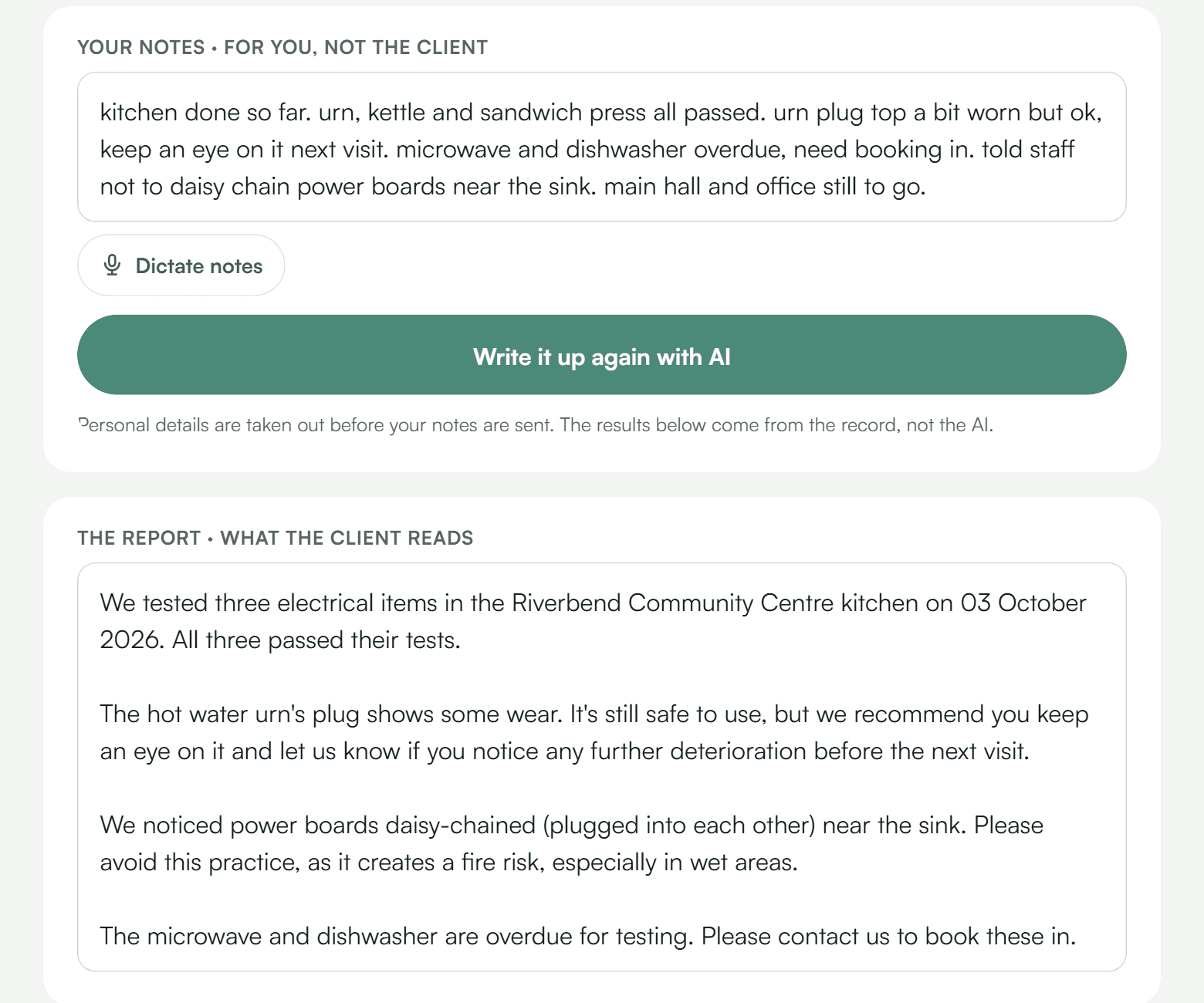
Lyra AI drafts it
You check and approve it
03Service report drafting
Rough notes in, client report out.
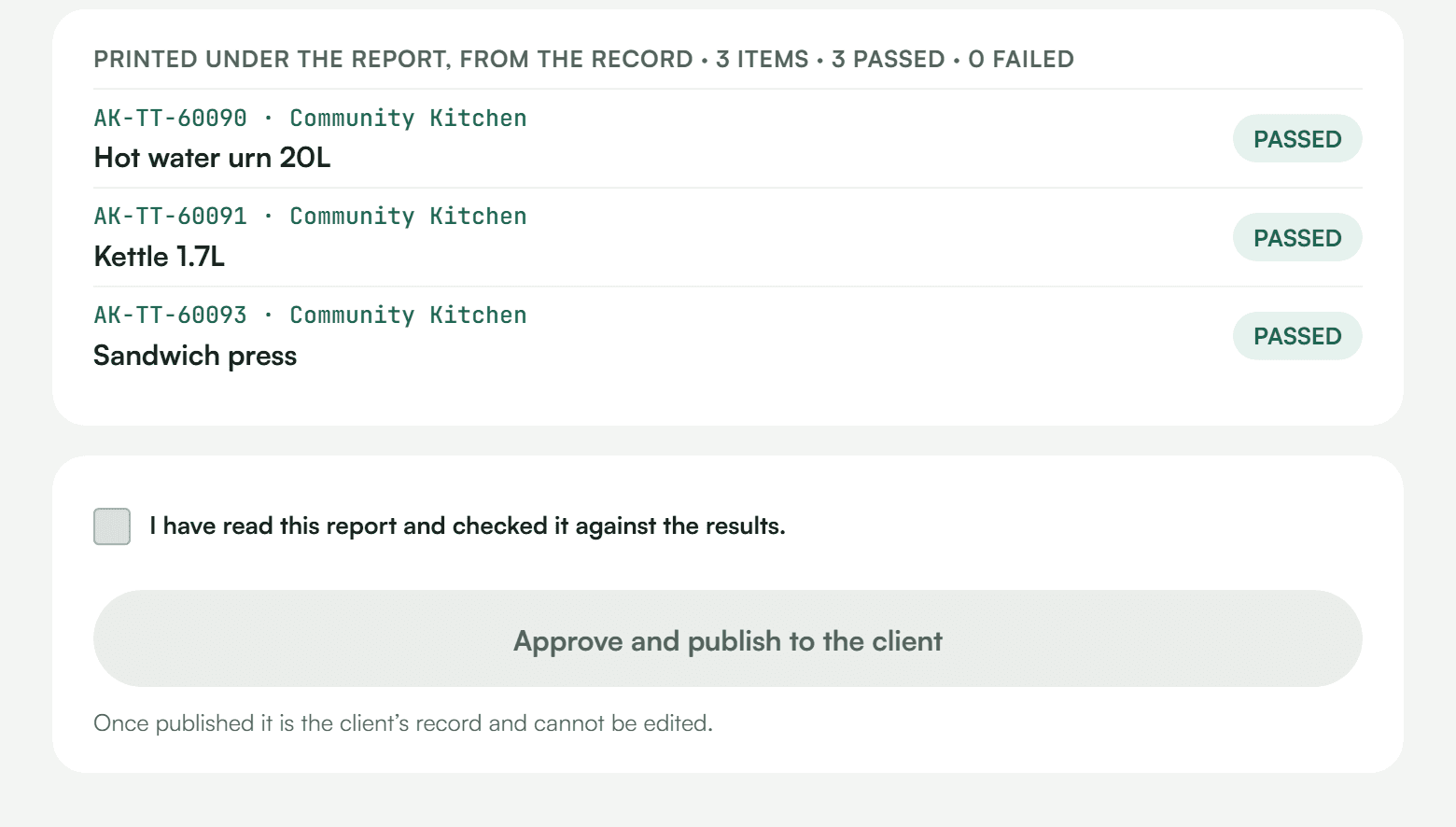
Jot a few rough notes when you finish a visit. Lyra AI turns them into a tidy report in plain English. The test results under it are printed straight from the record, and nothing reaches your client until you approve it.
Lyra does
Writes the service report from your notes
Writes the wording of compliance summaries
You control
Edit the draft until it says what you mean
Approve it before your client sees anything
Results and numbers come from the record
Plans: service report drafts and full compliance summaries are on Pro. Free and Solo certificates carry a plain-English summary counted from the results.
Real answers from the demo business, checked against the register.
04Questions and compliance
Ask your account, get an answer.
“Which clients are due next month?” “What's overdue at Riverside?” “Which invoices are unpaid?” Lyra AI answers from your own records, so you are not building a filter or a spreadsheet to find out.
Lyra does
Answers from your account as it is now
Lists what is overdue or due, by client and site
Reads the answer aloud when you ask by voice
You control
Type or speak the question
Check any answer against the register
Decide what to book, chase or retest
Plans: 5 questions a month on Free and 20 on Solo, about retests and due dates. Pro is unlimited and covers anything in your account, including invoices. Watch the tutorial.
Start freeLyra AI is on every plan. No card needed.
Talk to Lyra
Hands busy? Just say it.
Testers in one hand, plug in the other. Speak instead of typing, in Australian English, on iPhone, Android or a computer. Your phone turns the speech into words; nothing is recorded or kept.
Start freeNo card needed. Say it is on every plan.
Say the test, Lyra fills the sheet
Tap Say it on an item and talk: “visual fine, earth point one, insulation over range, leakage point two.” Lyra ticks the inspection, fills in the readings and suggests a result against the AS/NZS 3760 limits. You check it and tap Pass or Fail yourself.
Ask out loud, hear the answer
Tap the mic in Ask and say “which clients are due next month?”. Lyra reads the answer back to you. A spoken question counts the same as a typed one.
Dictate any note
Fail reasons, test notes, new items and fault reports all have a mic. Dictation uses your phone's own speech recognition, so it is on every plan with no allowance.
One minute, filmed on the Koalaris demo business. Captions are on the video.
Where the line is
What Lyra AI will never do.
You are the competent person, and your name is on the tag. Lyra AI is built so the decisions stay with you.
It never sets pass or fail.
A person taps Pass or Fail on every test. With Say it, Lyra suggests a result from the readings you spoke, and nothing is saved until you tap.
It never sends anything unchecked.
A drafted report waits for your approval, and an import waits for you to review every column match.
It never does the sums.
Test results are printed from the record, and every number in a compliance summary is calculated by Koalaris, not the AI.
It never sees another business.
Lyra works only from what the person asking is allowed to see, inside their own business.
Personal details stay out.
Personal details are taken out of your notes before they are sent to be drafted.
No recordings are kept.
Your phone or browser turns speech into words. The audio is not recorded or kept.
AI assists. Humans decide.
Lyra never sets pass or fail. You do.
How it works
It works from your records, not guesses.
Lyra AI works from your register, your notes, your photos and your imports, and only from what the person asking is allowed to see. It is built into the screens you already use, so there is nothing to set up.
Animated explainer: what Lyra AI works from, and what it can do with it.
Plans
Lyra AI on every plan.
Free and Solo include the everyday jobs with a monthly allowance, so you can try Lyra AI on your own records from day one. Pro includes everything, with no monthly count.
Allowances reset each month (on your billing date on Solo). Reaching one pauses only that Lyra AI feature; testing, tagging, certificates and your records keep working. A fair-use limit applies on Pro. Compare every plan
FAQ
Lyra AI, your questions.
Does the AI decide pass or fail?
No. A person sets every result. Lyra AI prefills, matches and drafts, and you confirm or approve each one. With “Say it”, Lyra suggests a result from the readings you spoke, but nothing is saved until you tap Pass or Fail yourself.
What can Lyra AI do?
It reads a rating plate photo to prefill a new item, matches spreadsheet columns on import, answers questions about your register, drafts service reports from your notes and writes the wording of compliance summaries. Every number in a summary is calculated by Koalaris, not the AI. Free and Solo include rating-plate reading, imports, “Say it” voice tests and due-date questions with monthly allowances; Pro includes all of it with no monthly count.
Can I talk to Koalaris instead of typing?
Yes. Every notes box has a mic for dictation, on every plan, with no allowance. In Ask you can speak your question and hear the answer read aloud. On a test, tap “Say it” and say the inspection and readings; Lyra fills in the sheet and suggests a result for you to check. Say it is 20 a month on Free, 100 on Solo and unlimited on Pro. Speech is turned into words by your phone or browser, and no recording is kept.
Does Lyra AI see other businesses' data?
No. Lyra AI only works from what the person asking is allowed to see, inside their own business.